I hope the heading of this entry has not made you open a new tab to look up any of the following phrases or anything close to them: Unified Limits in OpenStack Manila , Unified Limits in OpenStack, OpenStack, OpenStack Manila, OpenStack for Dummies.I will try my level best to explain what each term means to get you up to speed.
Definition of terms
OpenStack

OpenStack is an open source project whose main goal is to enable anyone build, maintain and deploy clouds.It is the Linux equivalent of AWS,GCP or Microsoft Azure within the cloud market.Essentially, it allows one to control vast amounts of compute, network and storage resources (😉😉-Data centers or the such).
It has deep roots within the open-source community and currently is one of the three most active opensource projects in the world and written entirely in Python.Those who wish to contribute to OpenStack can find the relevant infomation here.
Due to its notoriety within the open source community, lots of companies have backed OpenStack and it has been adopted and used in numerous cases such as healthcare, gaming and finance.
OpenStack Manila

OpenStack is a huge project.However, it is actually composed of various services which are responsible for specific actions.Manila is one of these services and it is responsible for shared-file systems.It has support for multi-tenancy(😉😉-Geek speak for it can be used by multiple projects or apps or consuming software).
Essentially what this means is that, say we have an organization that uses OpenStack.In our organization X, we have departments Marketing,Finance and Research.Within our OpenStack instance, we have a 10GB storage device that is attached to our network.Manila would allow us to only allow the Marketing and Finance departments to access the 10GB storage device and lock out the Research department from accessing the 10GB Storage device.Manila does this by only allowing the network ranges used by the Marketing and Finance departments to access the 10GB storage device.
Manila users
As a project, the main users of Manila are cloud administrators / cloud operators.They are the ones who set the rules that govern access and use of shares.They ought to be familiar with linux and command interface use.
How to contribute to OpenStack Manila
Anyone who is interested in making an opensource contribution to Manila can get started with information posted here.
Unified Limits in OpenStack
There are numerous services within OpenStack. Among these services, there is a service called Keystone which is responsible for API client authentication, service discovery and distributed multi-tenant authorization by implementing OpenStack’s Identity API.
The Keystone team came up with the idea of unified limits whereby Keystone stores and relays information known as limit.Limit here means the maximum number of resources associated with something. This limit can be used to enforce quota on resource use across all other OpenStack services including Manila.
There are two types of limits within unified limits.They are:
- Registered limits: Default number of resources for all projects. Projects with no override will use registered limits..
- Project limits: Override of registered limits that are default to a specific project only.
The main aim of Unified Limits in Keystone is to come up with a new quota system that involves all other OpenStack services. Limit information is stored in Keystone and resource usage calculation and enforcement is done by the individual service.
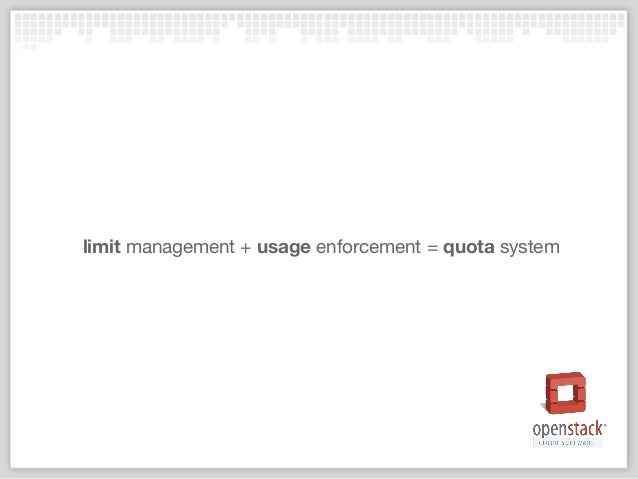
This would be beneficial to operators/ cloud administrators in the sense that they will be able to set limits through one interface and not in different services as is currently the case.For example, if an operator wants to set limits for the Cinder project, they have to go into the Cinder service and set the limits needed.If Nova limits are to be set too, they have to go into the Nova service and set the limits they need.This gets more confusing for them since all services have different implementation in limit setting.
To developers, they won’t be need to build their own limits API and would therefore focus their energy on usage calculation by the service they are working on.
Unified Limits in OpenStack Manila
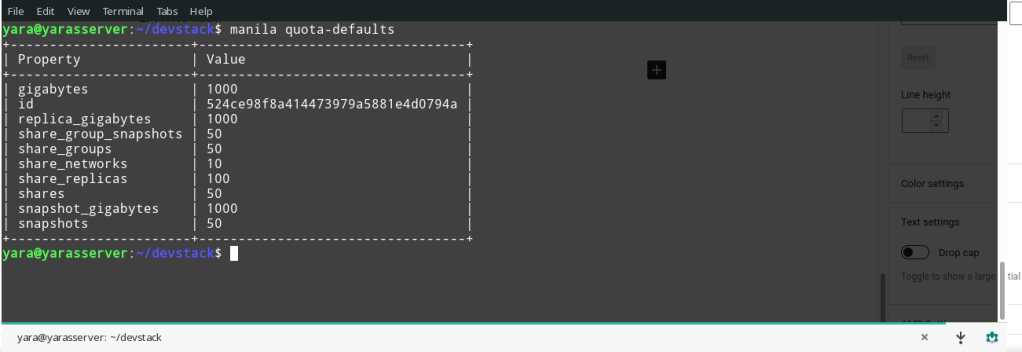
This is the title of my project.It actually means integrating the Keystone’s Unified Limits as explained above within the Manila project.
Basically, all default Manila quotas will be registered in Keystone as registered limits.All project limits will also be stored in Keystone.
50 will be the registered quota for shares in Keystone.In the eventuality that an operator wants to claim more resources say 5 more shares for project 524ce98f8a414473979a5881e4d0794a as shown in the above image.The flow will be as follows:
- The request will be sent to Manila, where current usage will be calculated. Say 25 shares are found to be currently in use.
- Manila will then go and look at Keystone for the limits that are have been set for project 524ce98f8a414473979a5881e4d0794a, in our case our share limit is 50 as shown in above image.
- The share information will be brought back to Manila and a simple check will be done where the current usage of 25 shares and requested usage of 5 extra shares are not meant to exceed the 50 share quota that was set in Keystone.Since 25 + 5 < 50, the requested shares will be granted to the operator. However, if 25 + 5 > 50, the requested number of shares would not be granted to the operator.

I hope you are now up to speed with most of the terms in the heading of this blog entry.It is an honour to be working on such a feature for the Manila project. It is new in that not many OpenStack services have it implemented and therefore we are working from scratch.It is a challenge that I intend to keep working on.
Below are some of the links that can help you understand OpenStack, OpenStack Manila and Unified Limits in OpenStack easily.

 Paul Mayero
Leave a reply to shayiris Cancel reply